CallScope is a product of Belton IT Nexus, New Zealand owned and operated Hosted in NZ or AU, or on your own servers · [email protected]
CallScope by Belton
Features

Everything in CallScope.

The complete feature list, grouped the way the product is organised. Features marked optional are switched off until you turn them on, and those that rely on a 3CX licence feature say so.
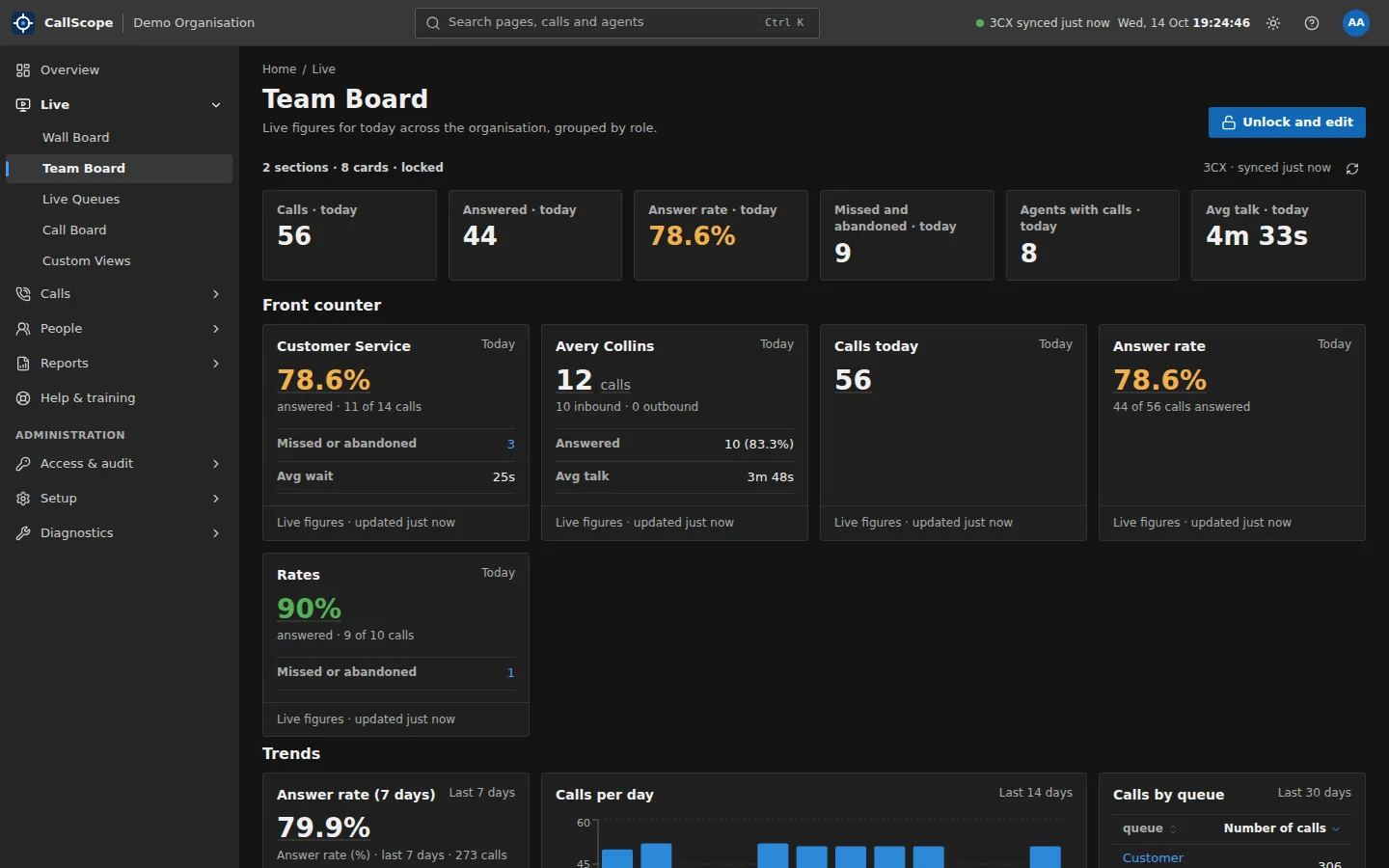
CallScope Team Board: live figures for today across the organisation grouped by team, with answer rate, missed calls and trends
Live operations

See what is happening now.

Screens for the floor, the team leader and the manager, built from your own 3CX data.

Live active-call streaming needs a 3CX Enterprise (8SC+) licence. Without it, boards show data synced every few minutes.
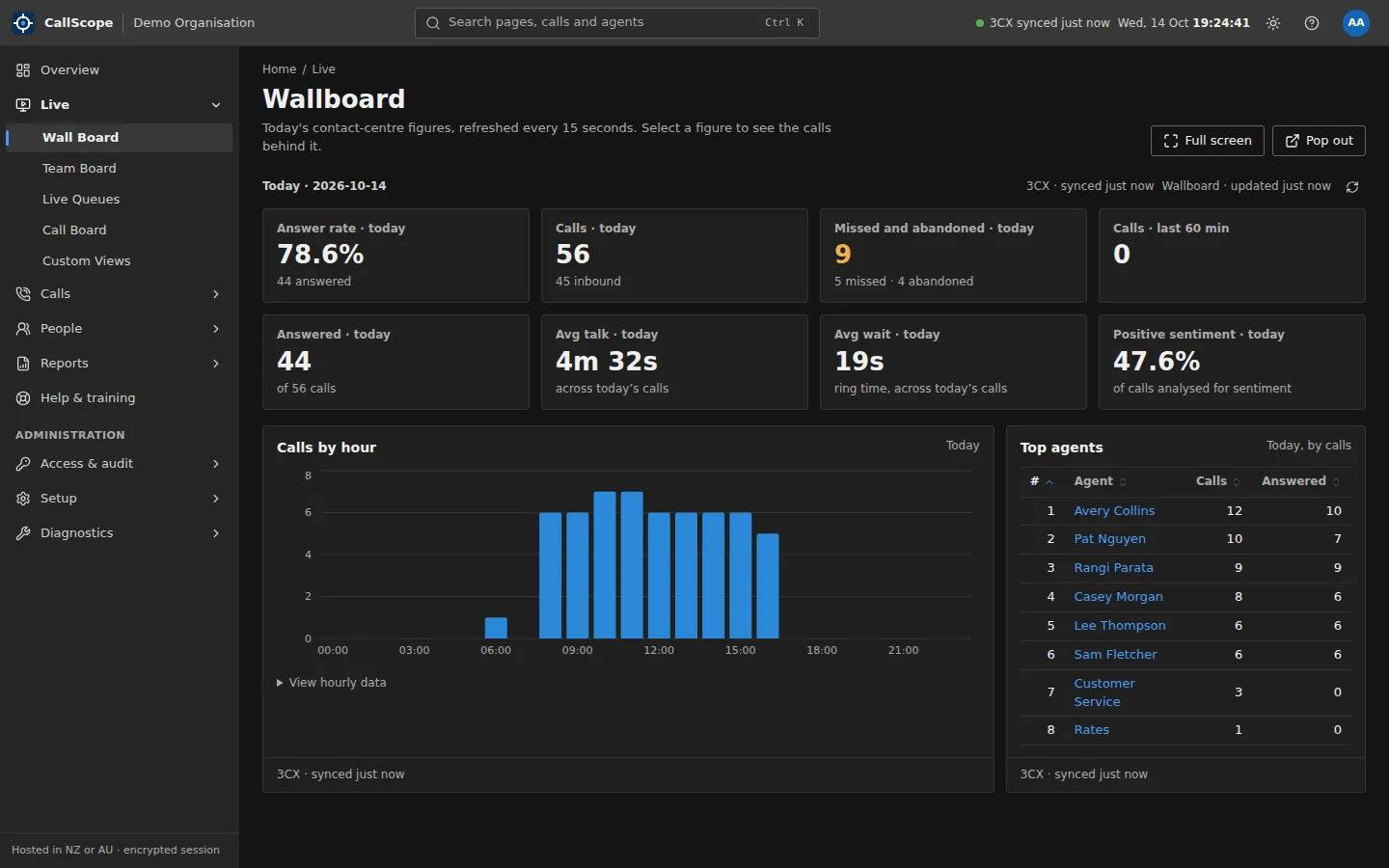
CallScope Wall Board: answer rate, calls today, missed and abandoned, calls in the last hour, answered, average talk and wait times, positive sentiment, calls by hour and top agents today
Wall Board Answer rate, calls, missed calls, wait and talk times, sentiment and top agents, refreshed every 15 seconds, with full-screen and pop-out TV modes.
Team Board and Custom Views Build your own screens from live tiles, charts, tables and KPI widgets, and share them across the organisation. No code.
Live Queues and Call BoardLive streaming Who is waiting, which queue is under pressure, and which agents are free.
Overview A customisable summary of what needs attention today, with period-on-period comparison.
Data freshness, always shown Every page says when 3CX last synced, so a stale number is never mistaken for a quiet day.
Find anything fast Search pages, calls and agents from anywhere with Ctrl+K, in a dark or light theme.
Calls and callers

Every call, and the person behind it.

A complete, searchable register of calls rolled up from 3CX call segments into the calls people actually made.
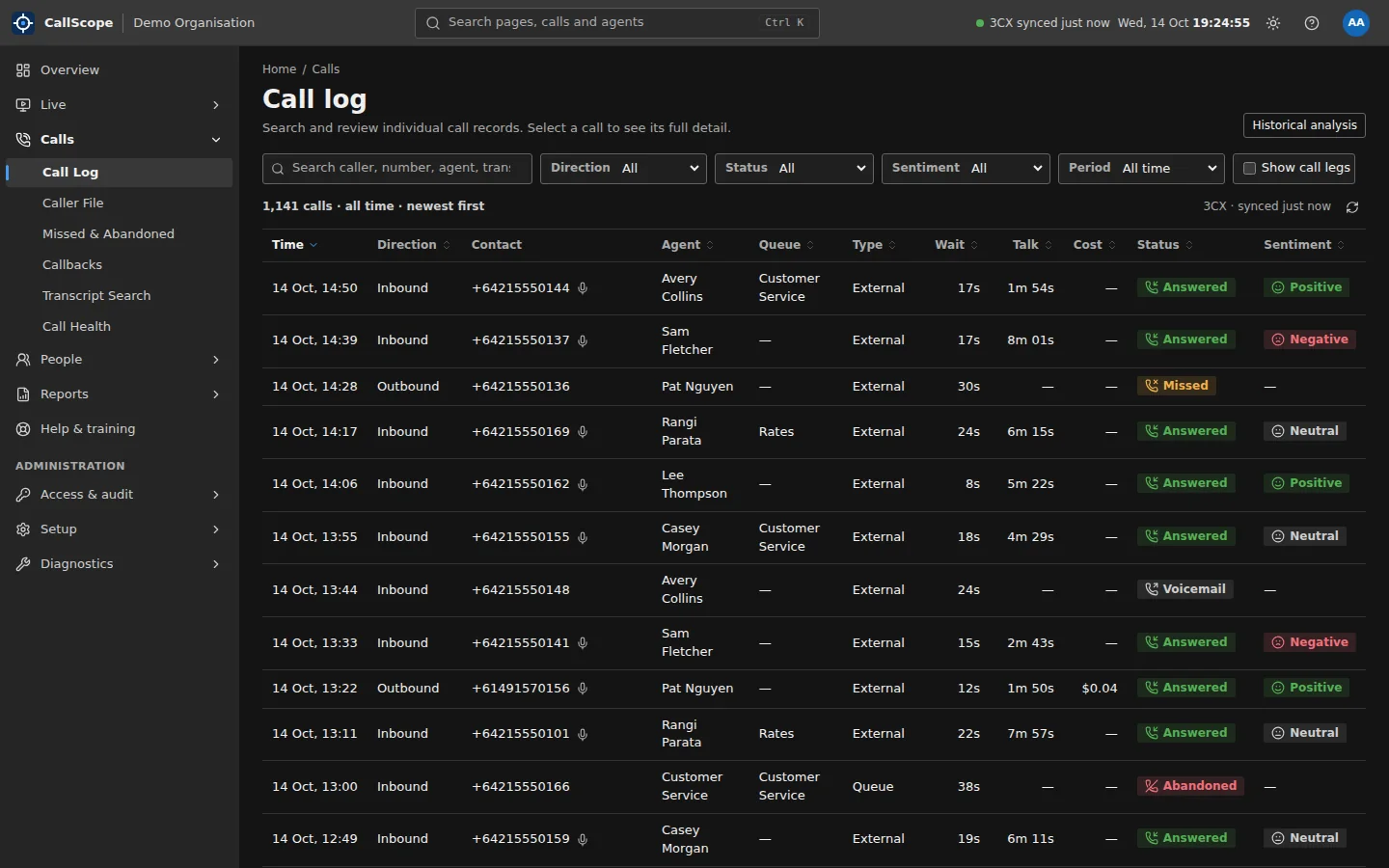
CallScope Call Log: a filterable list of calls with time, direction, contact, agent, queue, type, wait, talk time, status and sentiment
Call Log Filter by direction, status, sentiment, queue and period, bookmark a view, and open any call to see its path, wait and talk time.
Click-through figures Every number on every page opens the exact calls it counted.
Export everything Sort, search and export any table to CSV, with protection against spreadsheet formula injection.
Transcript SearchNeeds 3CX transcription Search across recorded calls for a word or phrase.
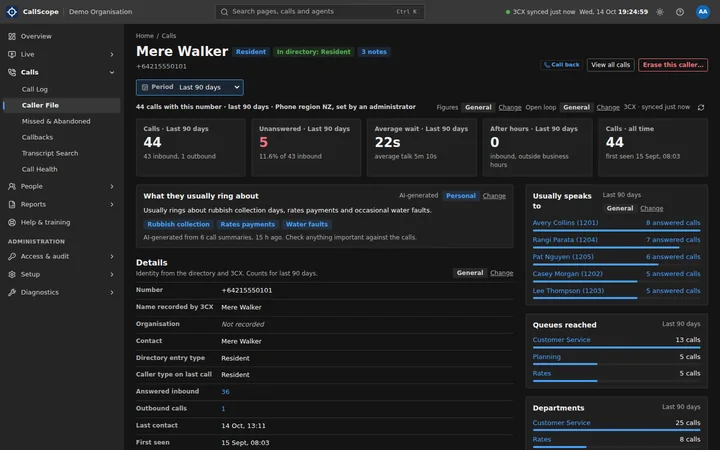
Caller FileOptional module One page per caller: their calls, who they usually speak to, summaries and sentiment, with every number format treated as the same person.
Shared caller notesOptional module Notes the whole team can see, each with a sensitivity tier, audited and expiring with your retention policy.
Current call bannerOptional, live streaming Shows who is ringing your own extension and offers to open their caller file.
AI caller summaryOptional, AI A short, labelled AI summary built only from 3CX call summaries, never full transcripts, refreshed at most daily.
Recording playback Administrators can play recordings in the browser, and every play is written to the audit log.
Missed-call recovery

Turn missed calls into a follow-up list.

Know why every call went unanswered, and make sure someone calls back.
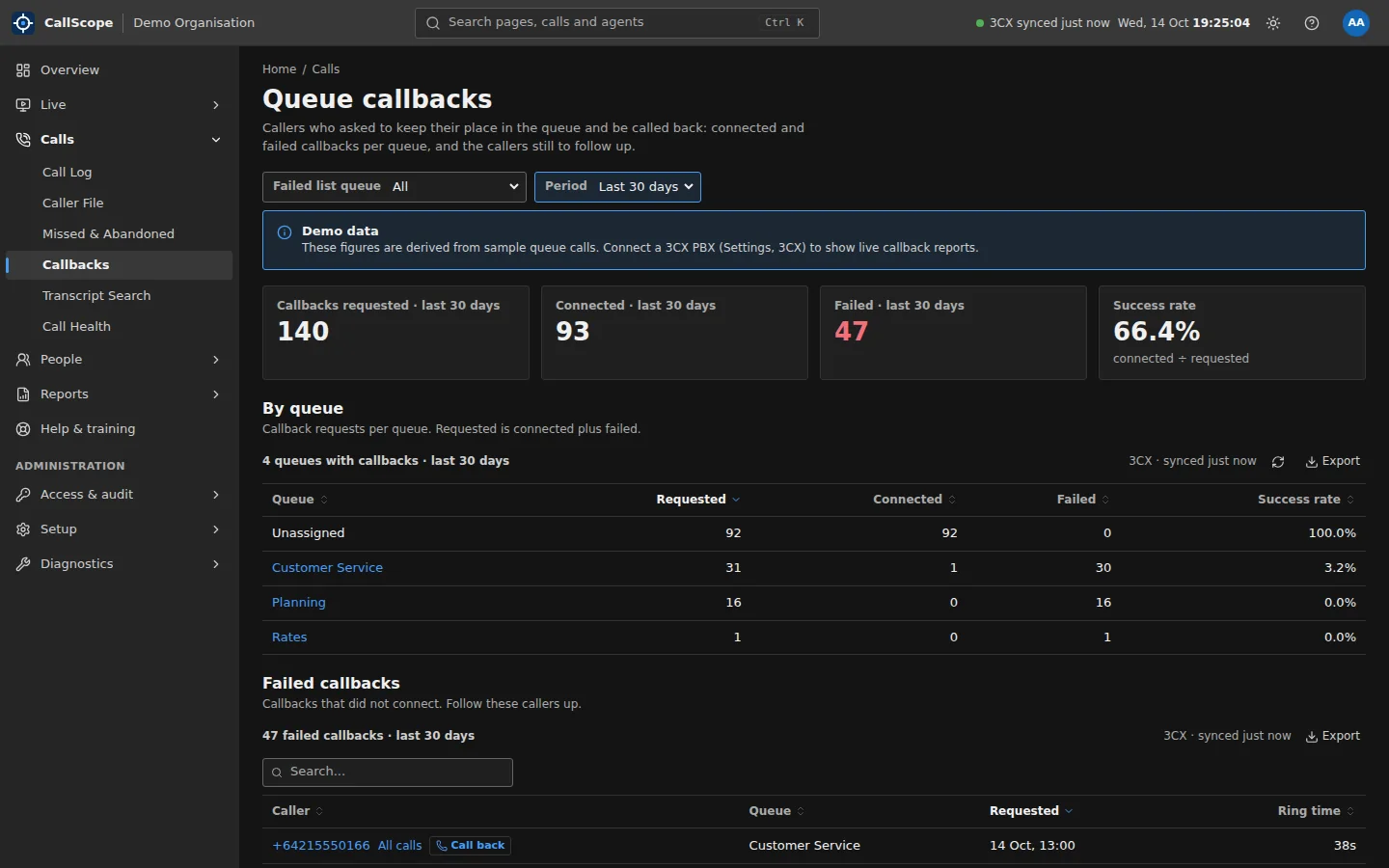
CallScope Queue Callbacks: callbacks requested, connected, failed and success rate for the last 30 days, broken down by queue, with a list of failed callbacks
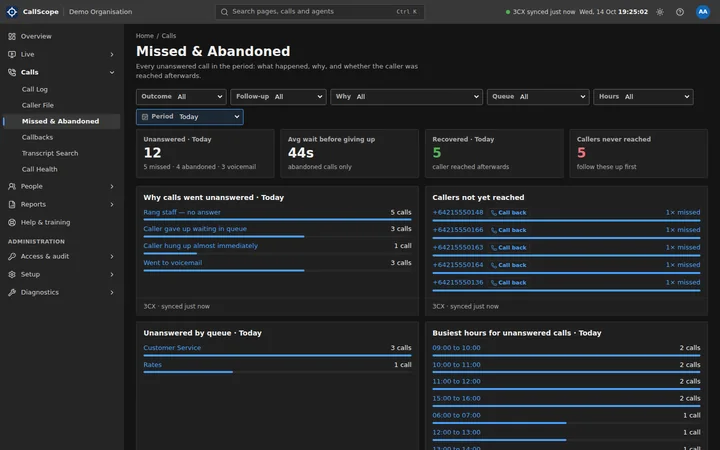
Missed & Abandoned A plain-English reason for every unanswered call, the route it took, and whether the caller was reached later.
Callbacks Queue callback requests by queue: requested, connected, failed, and who still needs a call.
Callers not yet reached Repeat and unreturned callers listed with a one-click call back, on the Overview and the caller file.
Busiest unanswered hours When calls go unanswered, so you roster to the gap.
People and quality

Fair, transparent coaching.

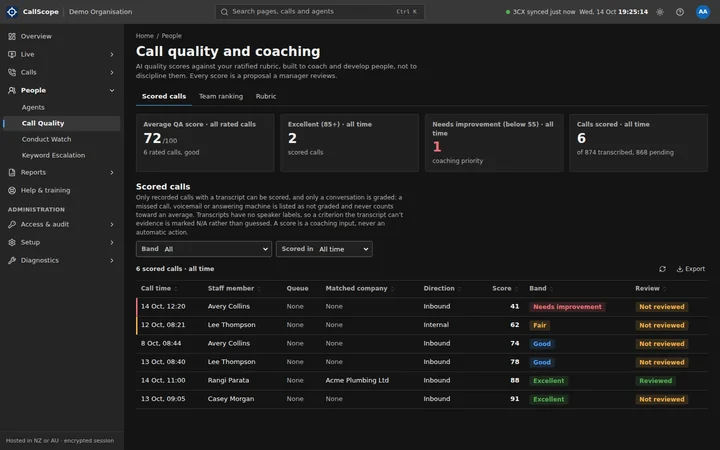
Scorecards built from real call figures, and optional AI quality scoring against a rubric you control.
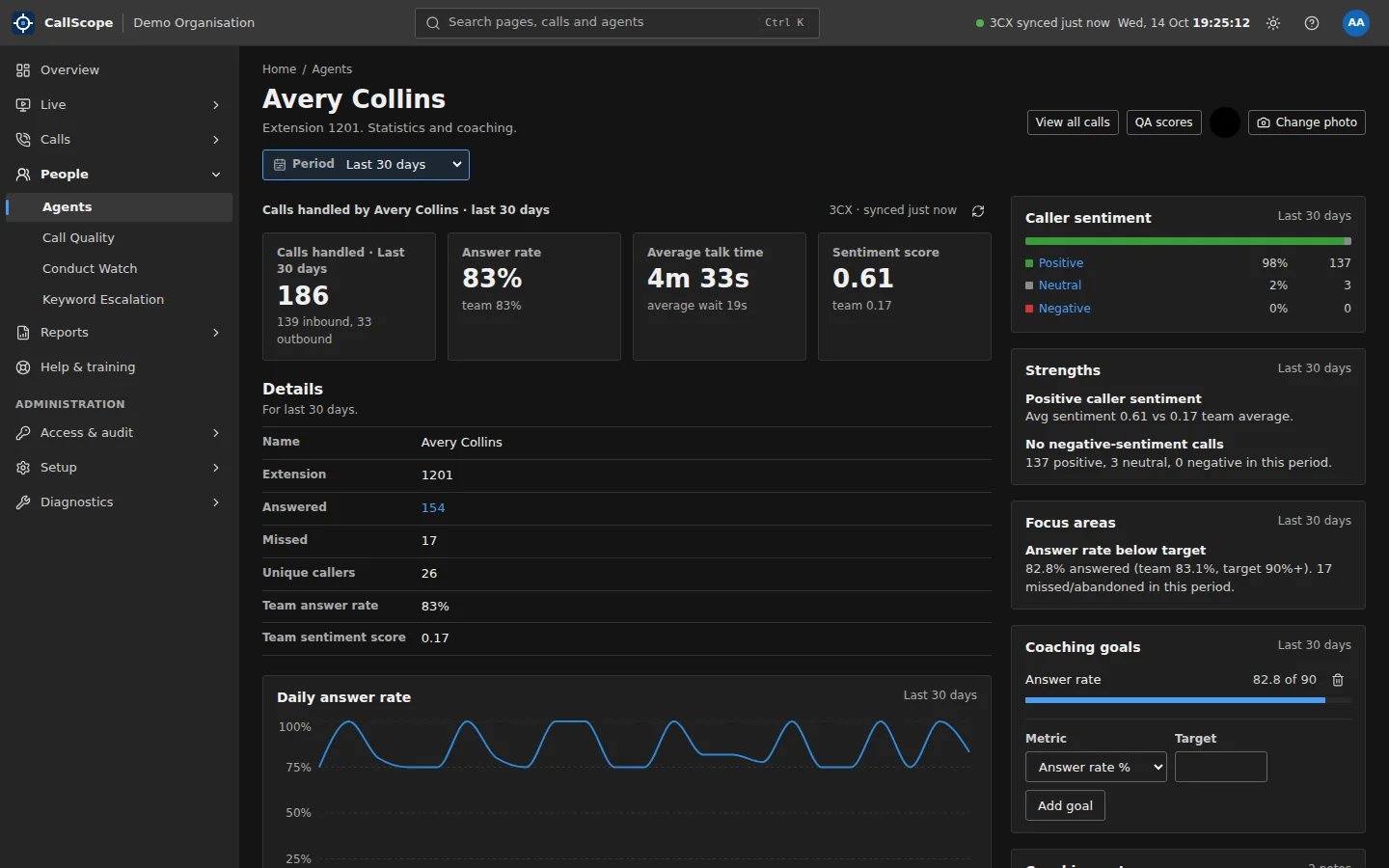
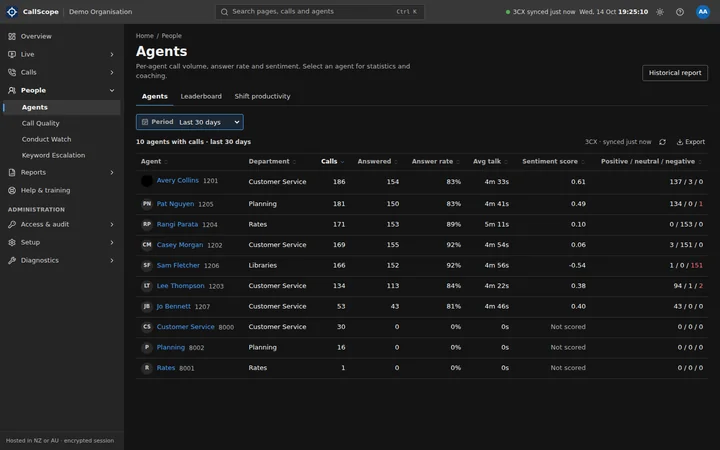
CallScope agent detail: calls handled, answer rate, average talk time and sentiment score, caller sentiment breakdown, strengths, focus areas and coaching goals
Agent scorecards Calls handled, answer rate, talk time, sentiment and shift productivity (occupancy) for every agent.
Leaderboard Ranked by calls answered, with badges earned from real call figures, never self-reported.
Coaching notes and goals Managers record coaching notes and set per-agent KPI goals, tracked over time.
Call quality scoringOptional, AI AI rates each recorded conversation against your weighted rubric, with strengths and improvements for the manager. A score is a coaching input, never an automatic action.
Conversations only Voicemails, answering machines and missed calls are recorded as not graded and never count toward an average or ranking.
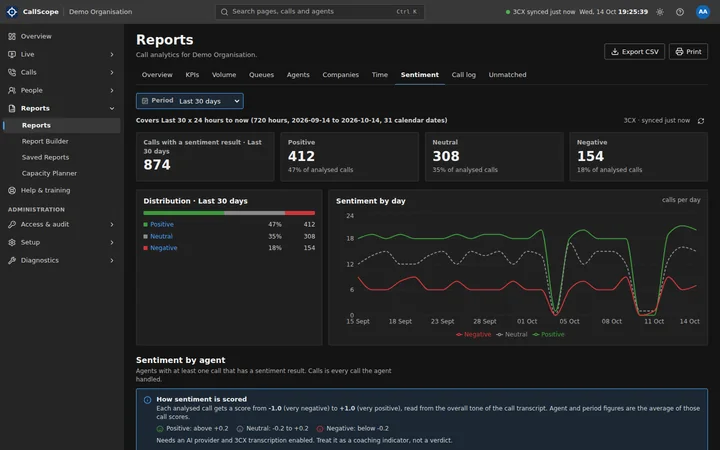
SentimentNeeds 3CX transcription Caller sentiment per call with reason and topic tags, daily trends and a per-agent view, from 3CX's own scoring.
Dead-air detection Long silences on recorded calls, surfaced for review.
Safeguarding and escalation

Know about the call that matters.

Flag calls that mention risk, harm, complaints or legal action, and tell the right manager straight away.
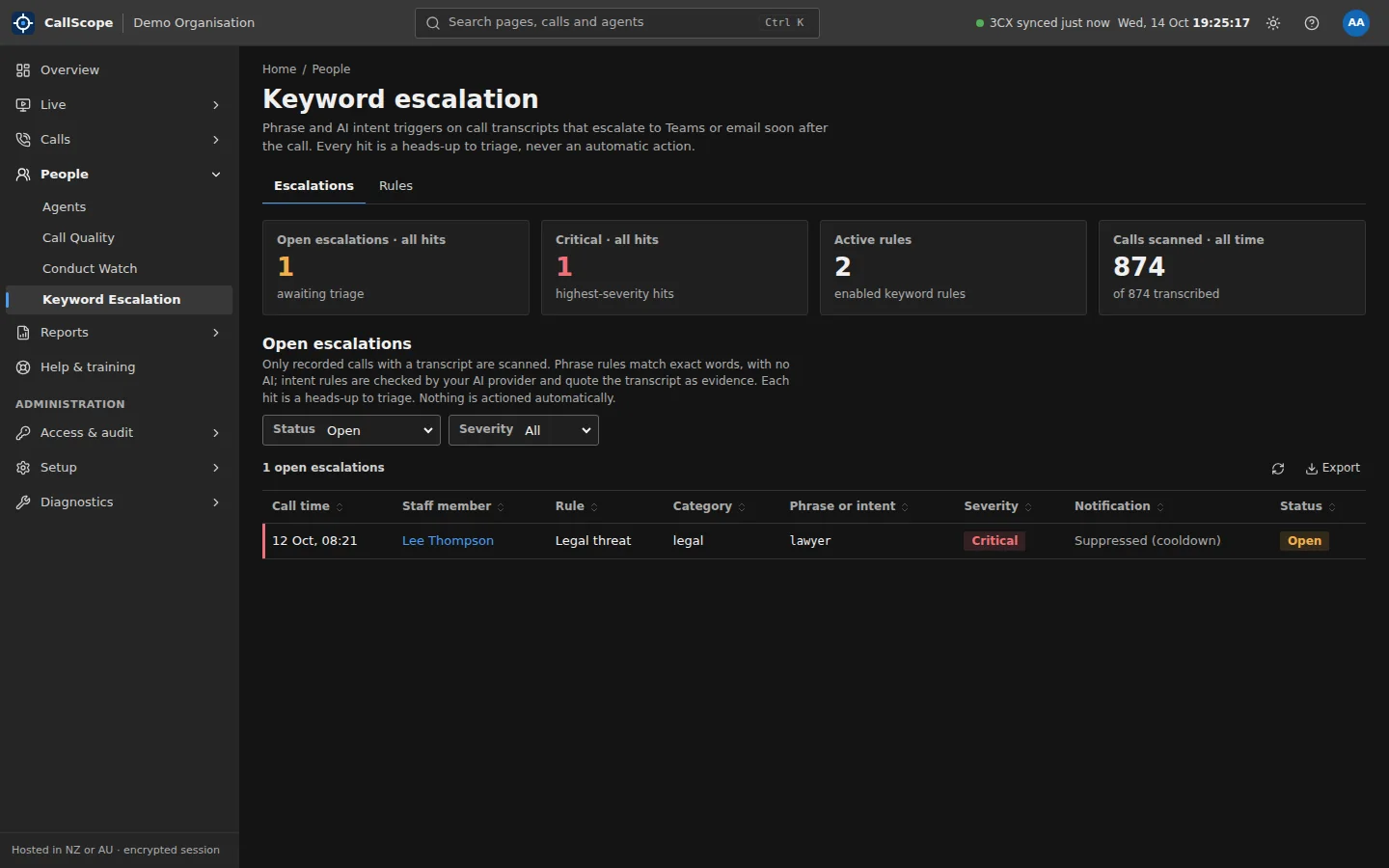
CallScope Keyword Escalation: open escalations, critical hits, active rules and calls scanned, with an open legal-threat escalation awaiting triage
Phrase rulesNeeds 3CX transcription Exact words or phrases matched on transcripts with no AI involved, so every hit is explainable to the letter.
Intent rulesOptional, AI Describe what to look for in plain English. Each hit quotes the transcript as evidence, and answers that quote text not in the call are refused and audited.
Starter safeguarding rules Self-harm risk, threats toward staff, legal action, formal complaints, cancellation and vulnerable callers, created switched off for your review.
Teams and email alerts Each rule alerts Microsoft Teams or email, with a cooldown that limits alerts but never what is recorded.
Review queue Every hit is acknowledged or dismissed with a note, and audited. Nothing is actioned automatically.
Rules look back A new rule is checked against recent calls, not only future ones.
Reporting and planning

Answers for the board, the council or the minister.

Contact-centre KPIs by queue, team, agent and hour, printable and exportable.
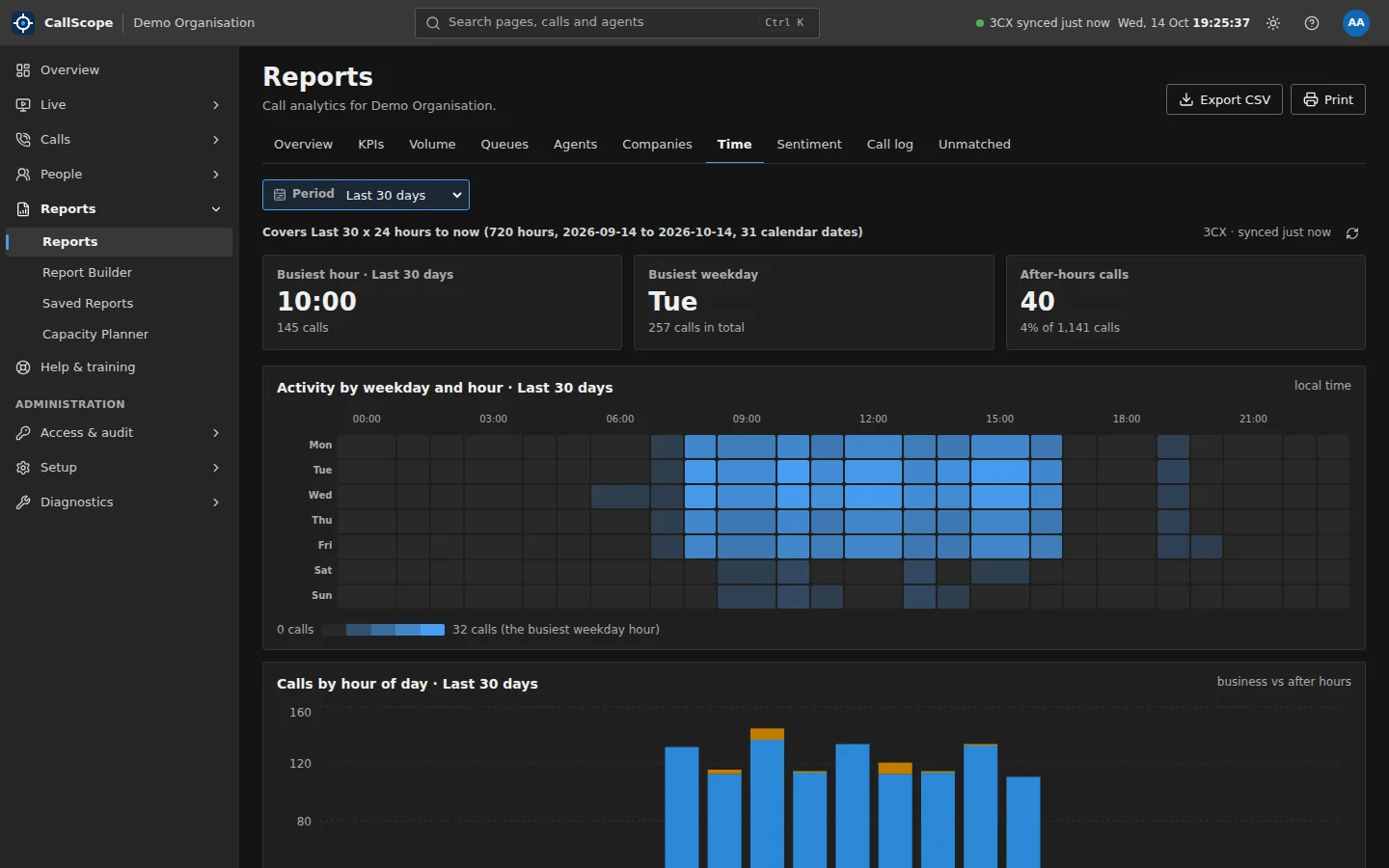
CallScope Reports, Time tab: busiest hour, busiest weekday and after-hours calls, with an activity heatmap by weekday and hour
Reports Overview with a health score out of 100, KPIs, Volume, Queues, Agents, Companies, a time heatmap, Sentiment and unmatched numbers.
Contact-centre KPIs Service level, average speed of answer, average handle time, abandonment and first-contact resolution.
Report Builder Ask in plain English and get a chart and a written summary. It never touches the database directly, and works without AI.
Saved Reports A weekly KPI snapshot captured automatically and frozen, for a fixed record you can compare over time.
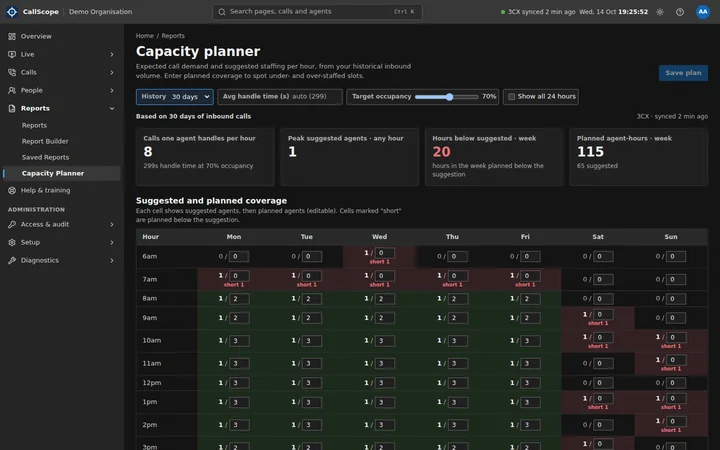
Capacity Planner Turns real call demand into suggested staffing by hour and day, against planned coverage.
Print and CSV Every report tab prints cleanly and exports to CSV.
Phone-system health

Catch the fault before it costs calls.

Read-only checks on how your 3CX is configured and behaving.
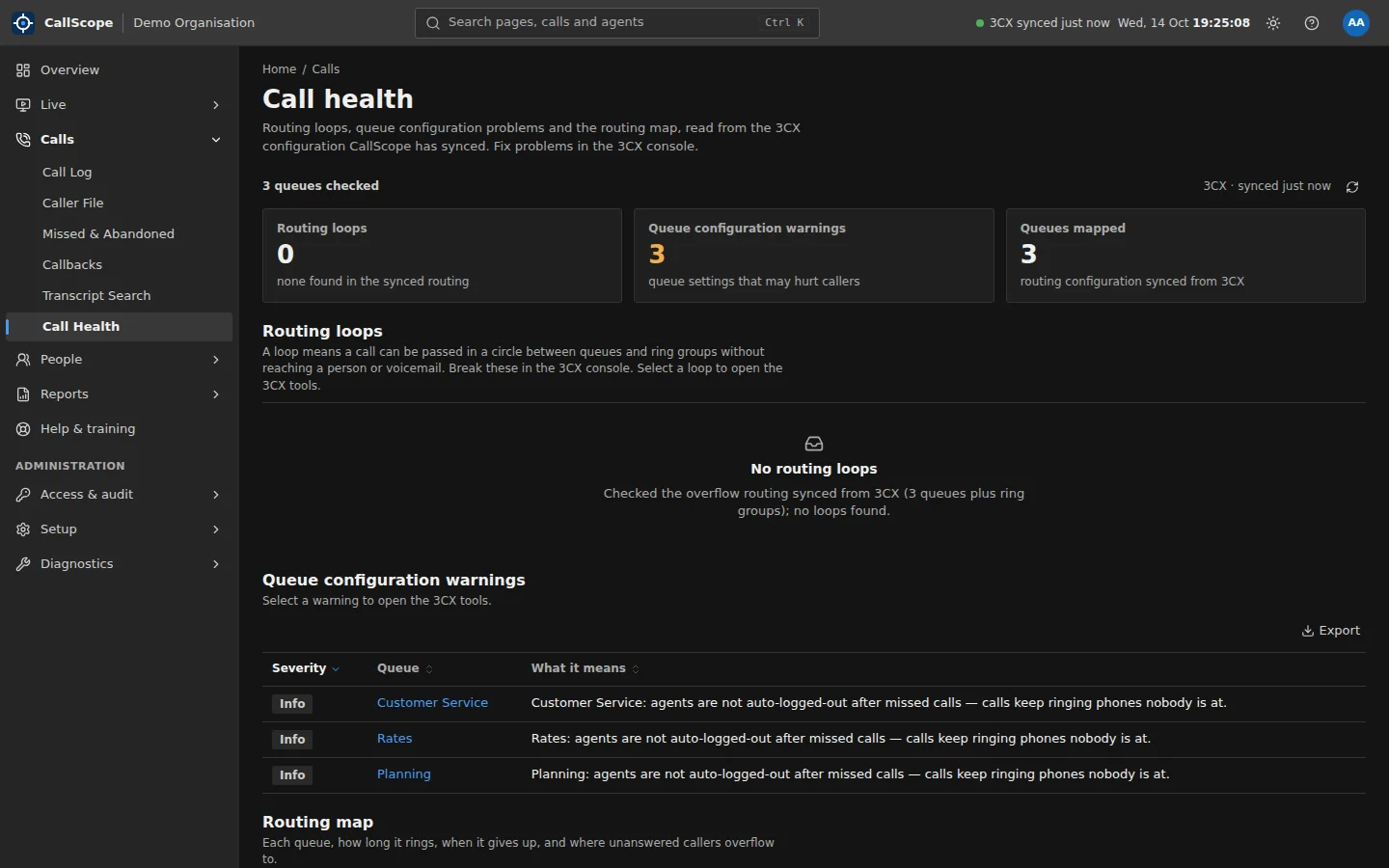
CallScope Call Health: queues checked, routing loops, queue configuration warnings and a routing map
Call Health Detects routing loops and dead ends, explains queue warnings in plain English, and maps how every queue rings and overflows.
3CX Tools Health snapshots, a configuration analyser graded against 14 hardening checks, and a catalogue of your 3CX backups.
Threshold alerts Teams or email alerts on answer rate, abandonment, long calls, routing loops, dead air and sync age.
Security, privacy and audit

Built for scrutiny.

The controls a public-sector security review asks about, with the evidence to show them.
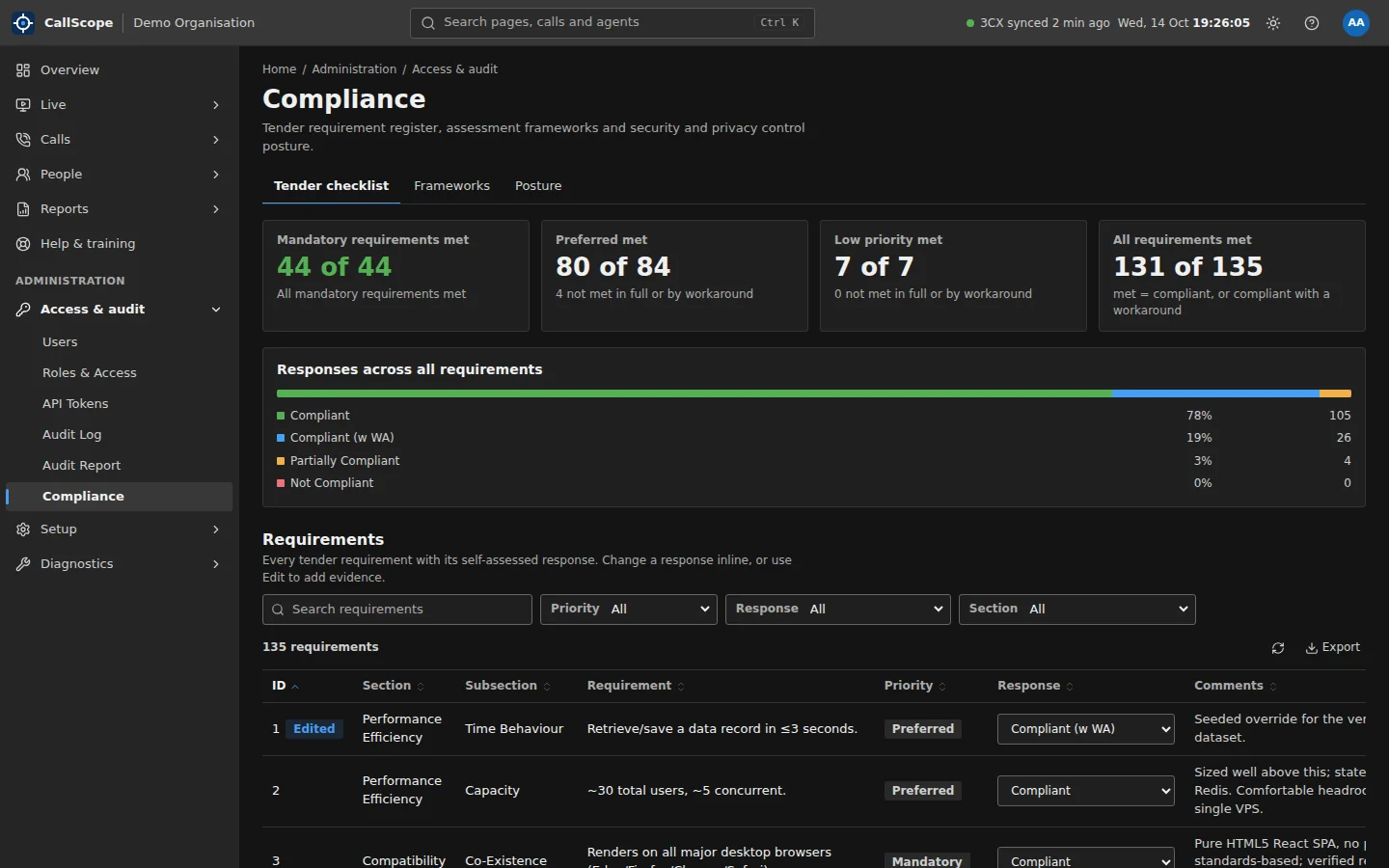
CallScope Compliance register: mandatory, preferred and low-priority requirements met, with responses across all requirements
Microsoft Entra ID single sign-on Tenant-pinned sign-in, with accounts never auto-provisioned as administrators.
Two-factor and session controls Two-factor is mandatory for administrators, plus progressive sign-in delay, session limits, idle timeout and per-user session revocation.
Role-based access Agent, team lead, manager and administrator roles, editable for your organisation and enforced on the server, deny by default.
Tamper-evident audit log Append-only and hash-chained, with a one-click integrity check, a printable audit report and optional offsite immutable copies.
SIEM exportOptional Ship the audit log to your SIEM as syslog over TCP or TLS, or pull it as NDJSON.
Card-number removal Card numbers are stripped from transcripts and summaries before they are stored. Always on.
Sensitivity tiers General, personal and sensitive information tiers on caller data. Hidden items are never sent to the browser.
Right to erasure Erase a call or a caller on request, with a tombstone so it is never re-synced.
Retention Data retention with a daily purge, and audit records kept for at least two years.
Encrypted backups Nightly AES-256 encrypted backups, with an optional offsite immutable copy.
Read API Scoped, expiring API tokens with an OpenAPI specification and rate limits, following the same sensitivity tiers.
Compliance register A built-in tender checklist and framework register to answer procurement questions with evidence.
Integration and platform

Fits the way you already work.

One read-only connection to 3CX, and choices about where everything runs.

Read-only 3CX connection Call records, queues, users and agent logins synced every 10 minutes through the 3CX API. CallScope never changes routing.
Real calls, not segments 3CX call segments are rolled up into the calls people actually made, so answered, talk time and abandonment are counted correctly.
Directory and team mapping Match numbers to organisations and contacts, and map extensions to the teams you report on.
Your choice of AI Off by default. Belton's own self-hosted model, a model you host, or Azure OpenAI in Australia. Offshore services are blocked unless you allow them.
Hosting your way A dedicated Belton-run instance in New Zealand or Australia, or a self-hosted container stack on your own servers.
Business hours and time zones One business-hours setting per organisation, with every report in your local time.
More screens

The real product, with synthetic data.
Frequently asked

About the features.

What can CallScope tell me about missed calls?

Every unanswered call gets a plain-English reason, the path it took through your phone system and whether the caller was reached later. Callers not yet reached are listed with a call-back link, and queue callbacks are tracked from request to connection.

What is Call Health?

Call Health reads how each 3CX queue rings and overflows, detects routing loops and dead ends, and explains queue misconfiguration in plain English. It finds the faults that lose calls before your callers notice them.

Does CallScope need call recordings and transcripts?

Most of CallScope works from 3CX call records alone. Transcript search, sentiment, keyword escalation and call-quality scoring use the transcripts 3CX already produces, so they need transcription enabled on your 3CX licence.

Can CallScope show a live wallboard for the floor?

Yes. The Wall Board refreshes every 15 seconds and has full-screen and pop-out modes for TVs. Live active-call streaming needs a 3CX Enterprise (8SC+) licence; without it the boards show data synced every few minutes.

Is the AI optional?

Yes. AI features (call-quality scoring, intent-based escalation, the AI caller summary and the plain-English report builder's summary) are off unless you turn them on, and the report builder still works without AI. You choose the AI provider, and offshore services are blocked unless you explicitly allow them.

Want to see it on your own call data?

Tell us about your phone system and we will show you what CallScope finds.